



Table of Contents
“Will the other party actually accept this digital signature and is it legally binding?”
This is arguably the most common question companies ask before transitioning to fully digital signing. Moving from paper to screen brings speed, but it also carries the fear of legal uncertainty. Signing technology is readily available today, but the real challenge lies in trust and proving that validity.
The problem of “Hidden” validation
In past practices, the process of verifying a digital signature was full of unnecessary steps. When you receive a digitally signed contract, how do you know the signature is truly valid and legally recognized?
The most common scenario looks like this:
- You download the sensitive PDF contract to your computer.
- You search for national or EU signature validation tools.
- You upload your confidential business document to an external website.
- You try to decipher a cryptic audit report full of technical terms.
This process not only slows down business and creates frustration for clients, but it also represents a serious security risk. Sending confidential contracts to third-party tools is something most IT departments strictly forbid.
The Solution: Built-in real-time validation
We decided to solve this problem right where it happens – directly within the app itself. Instead of forcing you to use external tools, we developed a system that automatically verifies every signature and presents the result to you in a simple, understandable, and legally irrefutable way.
Everything is exactly where you need it: in the right sidebar of your screen, right next to the list of all signers. This way, at any moment while viewing the document, you can see at a glance who signed it and whether that specific signature is technically and legally valid.
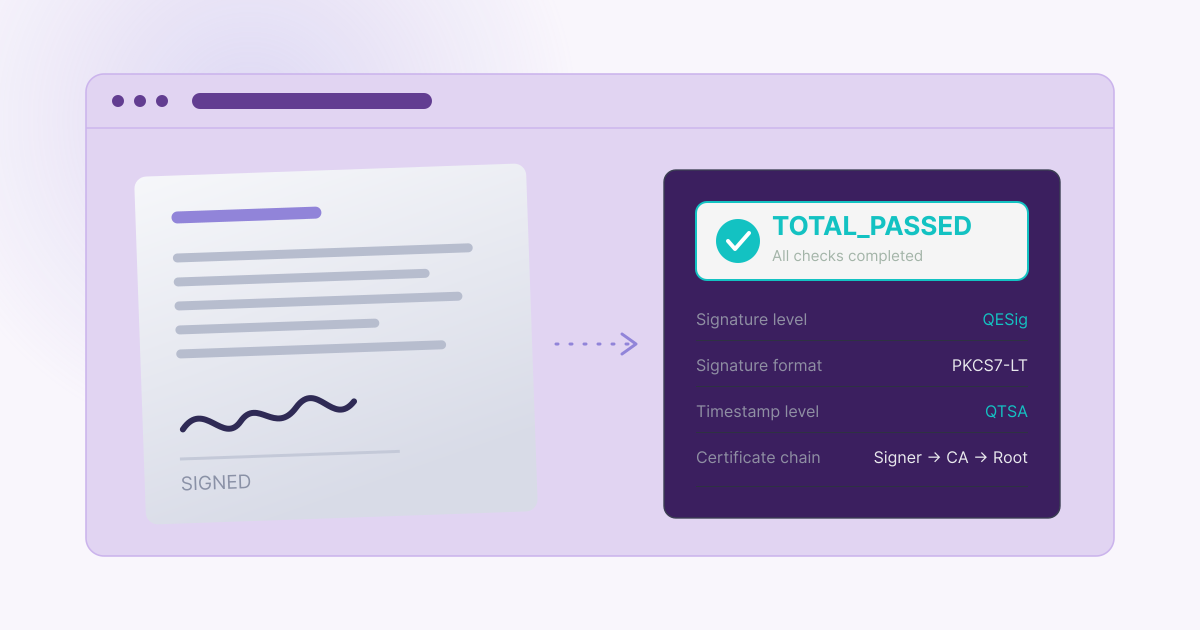
When you click on the validation of an individual signature, the system instantly gives you a complete forensic overview without the cryptographic jargon. Here is exactly what data your users get to see in real-time:
- Signed at: Exact time of the signature (e.g., 07.08.2026. 10:11 UTC)
- Indication (Status): Clear and unambiguous TOTAL_PASSED
- Signature level: Legal rank of the signature (e.g., AdESeal-QC)
- Signature level: Legal rank of the signature (e.g., AdESeal-QC)
- Signature format: Technical standard (e.g., PAdES-BASELINE-T)
- Certificate chain: Clear display of the trust route (e.g., Vizibit electronic seal → Qualified issuer → Root CA)
- Timestamp:
- Produced by: Timestamp source (e.g., timestamp-issuing-key-03)
- Timestamp level: QTSA (Qualified Time-Stamping Authority)
- Timestamp time: 07.08.2026. 10:11 UTC
- Timestamp indication: PASSED
Three possible scenarios: No room for guesswork
To ensure complete transparency, our built-in validation translates complex technical checks into three clear statuses (indications). When you click on a signature, you will immediately see one of the following scenarios:
- TOTAL_PASSED: The cryptographic check is successful, the certificate chain is complete up to a trust anchor, and the signature complies with all validation rules. The document is 100% secure and valid.
- INDETERMINATE: The format and cryptographic math are structurally valid, but the system lacks sufficient information to definitively confirm or deny its full validity (this most often happens when using a certificate outside the recognized national/EU trust lists).
- TOTAL_FAILED: The cryptographic check failed (meaning the document was altered after signing) or the structure of the signature format is fundamentally broken. The document is invalid.
Such a transparent display in the sidebar eliminates any doubt and confirms that the signer’s identity has been verified through a qualified provider (QTSP), protecting you from potential fraud.
Verification flexibility: Validation during the workflow and for external documents
This level of transparency is not reserved only for the final, fully completed document. The system allows you complete control and insight into the validity of signatures in two key everyday situations:
- Verification during an active workflow: You don’t have to wait for the process to finish to be sure of the validity. While the signing process is still ongoing, you can track the status at any time. Depending on who has already signed the document at that moment, the system immediately allows you to check the validation for each individual signature collected so far in the sidebar.
- Validation of already signed (imported) documents: What if a partner sends you a contract that they have already signed on their end? It is enough to upload that document into our app and start your standard signing process. Our system will automatically recognize, analyze, and perform a full validation of all external signatures that were already on the document before you uploaded it.
This way, regardless of whether the process starts with you or you are continuing with an already initiated document, you have irrefutable proof of the legal validity of each individual seal and signature at any given moment.
Transitioning to simpler business
Legal compliance no longer has to be complicated, slow, and full of technical jargon. Your partners and clients deserve a process where they can sign and verify a contract in just a few clicks, with a feeling of complete security and professionalism.
Now that you know your documents are legally protected without the need for external tools, it’s time to speed up your sales processes and forget about paperwork.
Try it yourself and test the new standard of digital business – try our built-in validation completely free today.
Table of Contents